
Designing an AI-First Learning Experience
This project began with a bold question: What if learning could adapt to the learner?
The goal was to design an education platform powered by AI that delivers personalized content, real-time feedback, and intelligent learning paths—making studying smarter, not harder.
In the video below, I’ll introduce the product, share the core challenges we set out to solve, outline my role in the project, and give a quick overview of the design process that follows.
A Human-Centered Design Process
To deliver a product that truly meets user needs, we followed a human-centered, iterative UX design process. This structured approach ensured that every design decision was backed by real insights, user validation, and business alignment. From discovery to delivery, each phase was crafted to bring clarity, consistency, and impact.
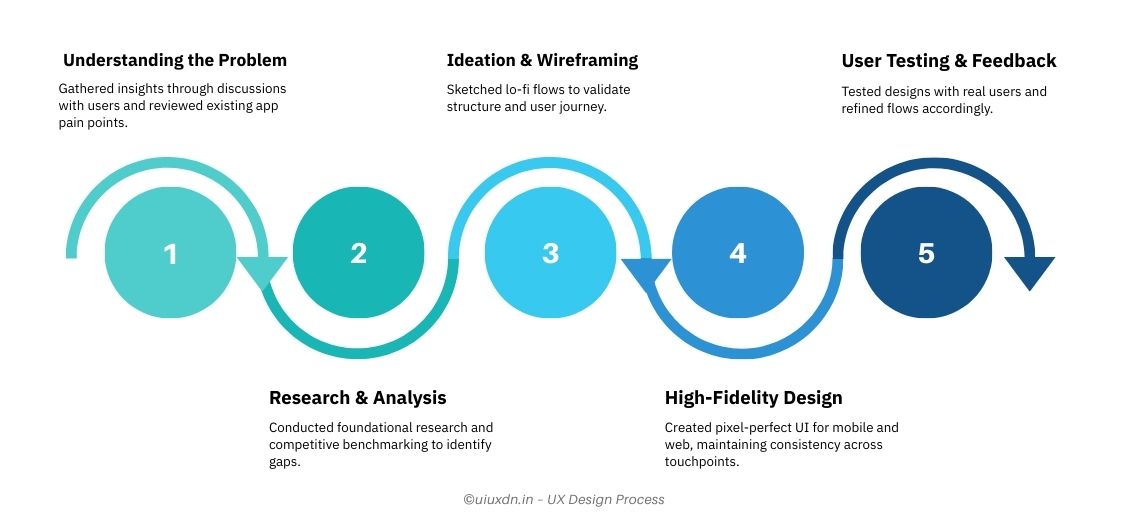
1. Understanding the Problem
This phase was all about uncovering the core problems through research, stakeholder inputs, and market analysis. It helped us identify pain points and shape a user-centered design direction. In the video below, I walk through how we approached discovery, key insights we uncovered, and how they informed our next steps.
2. Research & Analysis
With a clear problem in mind, we dove into research—conducting ground-level studies, mapping user insights, and analyzing competitors. This phase helped validate assumptions and uncover real user needs.
In the video, I walk through our research methods, how we used affinity mapping to organize findings, a snapshot of the competitive landscape, and the key takeaways that shaped our design decisions.
3. Ideation & Wireframing
In the ideation phase, we translated research into actionable design solutions. By creating user personas, mapping out user journeys, and refining the information architecture, we laid the groundwork for intuitive and user-friendly interfaces. We then translated these ideas into low-fidelity sketches to explore different design possibilities.
In the video, I’ll show how we used these tools to frame the experience and make critical design decisions. You’ll also see how lo-fi wireframes began to take shape based on user flows.
4. High Fedility Design
In this phase, the concepts we developed throughout the process came to life in the final product. From polished UI designs to seamless interactions, the application now provides a user-friendly and intuitive healthcare experience. The final design also reflects user feedback, ensuring that the product aligns with real needs and expectations.
Wrapping Up the Journey
I’ve summarized the key learnings, challenges we overcame, and the impact of the work done so far. I also address a few common questions and share reflections on the entire design process. In this final video, I’ll walk you through the main takeaways, answer a few frequently asked questions, and wrap up with a heartfelt thank you for exploring this case study.
Thanks for Watching
That wraps up this case study. I hope it gave you a clear look into my design process and thinking. Let’s build something meaningful together. 🚀
🔗 I’ve also shared a project based on a similar concept on Behance – feel free to check it out: LearnQuest – AI-Powered Education App.